Presets: a toolkit for agent-based inference optimization
Optimizing model inference is agent work now. Every inference provider does it inside its own process, on its own serving stack, with its own harness around the optimization agent. Despite the progress in open-source serving frameworks, what gets published is a benchmark, often without the workload, the concurrency, and the hardware behind it. The optimized deployment itself stays tied to the stack that produced it.
Today we're introducing a preview of presets: an open-source toolkit that streamlines inference optimization with agents, and a portable preset format.
Deploying Kimi K3 to any cloud, Kubernetes cluster, or bare-metal fleet should be as simple as deploying a Docker image. Taking a model someone has already optimized and running it on your own hardware should not mean rebuilding the stack or repeating the optimization, whichever silicon you have.
Toolkit and portable format
Think of Docker images. Docker gives you a toolkit for building an image, and a format that deploys to any datacenter or cloud reproducibly.
dstack introduces a similar concept applied to building optimized inference and its deployment. Presets offer two things: a toolkit that streamlines the optimization itself using agents, and a portable format that deploys the final preset to any cloud, Kubernetes cluster, or bare-metal fleet.
These are the toolkit's main parts:
| Constraints | A result only holds for a workload, a concurrency, and the hardware it ran on |
| Trials | The agent works inside a strict trial framework. Every trial is benchmarked, and what it learns pushes the next one further |
| Previous sessions | Sessions can be chained, so the agent learns across sessions, not only within one |
| Baseline | Every session first establishes the baseline, then pushes the performance beyond it |
| Custom prompt | The harness does not replace the engineer's feedback. A prompt steers each session and carries that feedback into it |
| Orchestration | Building a preset for a large model involves orchestration. The toolkit automates it through dstack |
In addition to the toolkit, presets introduce a portable format. It holds the serving configuration that produced the result: how the model is served on a single replica, or across replica groups when prefill and decode are split apart. It also holds the benchmark it reached and the exact hardware it was verified on, so a number never travels without the machine it came from.
How it works
Presets can be used for three kinds of work.
| Use case | |
|---|---|
| An optimized baseline | Finding the best configuration reachable without patching source code |
| Optimizing through patching | Optimizing the serving framework, kernels, libraries, and drivers through patches to the source code |
| Supporting new hardware | Adding support and optimizing inference on new, untested hardware |
To create a preset, you define a model repo or a base model, a fleet to deploy it to, the constraints, the number of trials, and the other preset configuration options:
type: preset
name: qwen38-27b-mi300x-1m

# The agent picks a compatible variant of the base model
base: Qwen/Qwen3.8-27B

# The fleet whose hardware the preset is optimized for
fleets:
  - name: trials-mi300x

# The constraints the preset must meet (time to first token is in milliseconds)
min_context_length: 1000000
max_ttft: 1500

# The number of benchmarked trials
trials: 7

# The workload every benchmark uses
concurrency: 4
input_tokens: 10000
output_tokens: 1500
To start the agent session for a given configuration, pass it to dstack apply:
$ dstack apply -f preset.dstack.yml

 Project  main
 User     admin
 Fleets   trials-mi300x

 #  BACKEND             RESOURCES                                           INSTANCE TYPE               PRICE
 1  amddevcloud (atl1)  cpu=x86:20 mem=240GB disk=720GB gpu=MI300X:192GB:1  gpu-mi300x1-192gb-devcloud  $1.99  idle

Create the preset qwen38-27b-mi300x-1m? [y/n]:
The agent then starts the optimization work, using your local claude: profiling the model on the fleet's hardware, patching what it has to patch, and recording every experiment as it goes.
You can see the created and running presets and their progress with dstack preset list:
$ dstack preset list -a
 NAME                      ID        BASE              CONSTRAINTS      BENCHMARK                                    STATUS              SUBMITTED
 qwen38-27b-mi300x-crack2  6900d9d7  Qwen/Qwen3.8-27B  io=10K/1.5K c=4  tps/user=138 ttft=852ms ctx=1M      ████     verified (4/15)     3 days ago
 qwen38-27b-mi300x-crack   53fef377  Qwen/Qwen3.8-27B  io=10K/1.5K c=4  tps/user=132 ttft=884ms ctx=1M      ▆█··     verified (4/15)     3 days ago
 qwen38-27b-mi300x-patch   bbcc9c66  Qwen/Qwen3.8-27B  io=10K/1.5K c=4  tps/user=112 ttft=879ms ctx=1M      ▆▇▇▇▇█   verified (6/15)     3 days ago
 qwen38-27b-mi300x-spec    7c8ec97b  Qwen/Qwen3.8-27B  io=10K/1.5K c=4  tps/user=85.3 ttft=1.35s ctx=1M     ▅▆▇█▇▇█  verified (7/7)      3 days ago
 qwen38-27b-mi300x-1m      8e8267cc  Qwen/Qwen3.8-27B  io=10K/1.5K c=4  *tps/user=34.1 ttft=4.2s ctx=1M     ▆▆▆██·█  verified (7/7)      4 days ago
Qwen3.8-27B on one MI300X
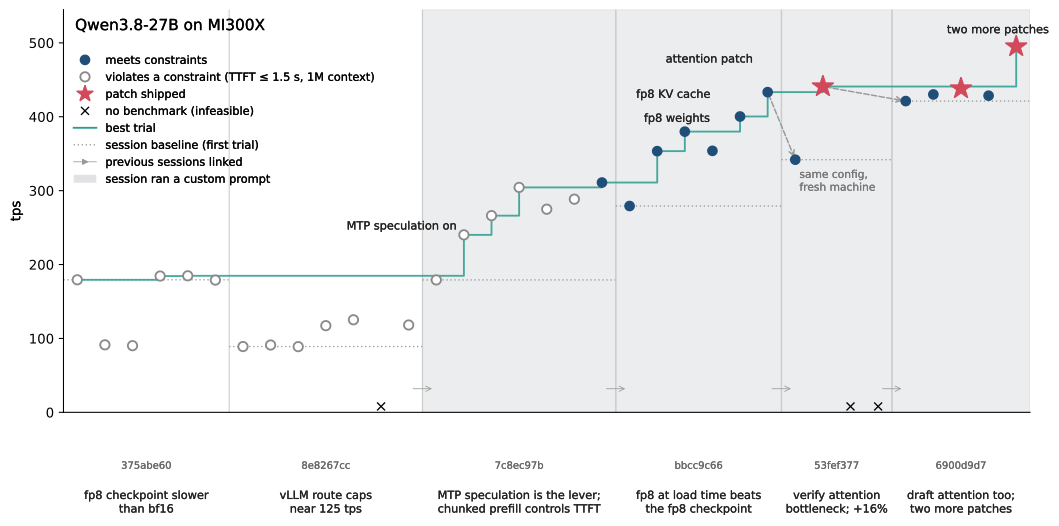
A small example of using presets: optimizing Qwen3.8-27B on a single MI300X. The constraints were the full 1,000,000-token context, p50 time to first token under 1.5 seconds, and a workload of four concurrent users with 10,000 input and 1,500 output tokens per request.
An optimized baseline
The first session settled on SGLang and reached 184.81 tok/s. Its best p50 time to first token was 1834ms, above the 1500ms constraint, so no trial met the constraints.
It also produced a finding the later sessions reused: the vendor's own FP8 checkpoint was slower than bf16 on this card.
Compound learning
Learning compounds when sessions are linked. Through previous, each session inherits the previous best, the findings behind it, and the patches, so nothing is re-derived.
310.98 tok/s, then 433.31, then 440.91, each session starting where the last stopped. The first two, with no records to start from, produced nothing.
The toolkit automates the routine and leaves the steering to the engineer, through the prompt. The fifth session was told to attack the bottleneck only through patching source code, which is where the first patch came from. The sixth was told the previous agent had contradicted itself and that the bottleneck was still there:
Custom prompt
type: preset
name: qwen38-27b-mi300x-crack2

base: Qwen/Qwen3.8-27B

fleets:
  - name: trials-mi300x

prompt: |
  The previous agent was not accurate and contradicted himself. The bottleneck
  is still there. Your goal is to be more critical and attack it much further —
  through patching source code: the engine, the serving framework, kernels,
  anything. A 1.5x improvement over the seeded best is the minimum. If you
  think it's not possible again, rethink by attacking your conclusion
  critically.

previous:
  - 375abe60
  - 8e8267cc
  - 7c8ec97b
  - bbcc9c66
  - 53fef377

min_context_length: 1000000
max_ttft: 1500
trials: 15

concurrency: 4
input_tokens: 10000
output_tokens: 1500
495.03 tok/s, 1.6x the first result that met the constraints, on the same single MI300X.
Exporting a portable preset
To export a preset as a service configuration, pass its ID to dstack preset export:
$ dstack preset export 6900d9d7 -f qwen38-service.dstack.yml
Preset 6900d9d7 exported to qwen38-service.dstack.yml (2 files). Deploy it with dstack apply -f qwen38-service.dstack.yml
Exporting writes the portable format to disk: the serving configuration and the patch files it references. Both are plain files you can read, review, and keep in version control.
To deploy the built preset to a cloud, Kubernetes cluster, or a bare-metal fleet, run
dstack apply -f. Export today produces adstackservice configuration only. Plain Docker and Kubernetes configurations are planned.
Coming soon
Prefill-Decode disaggregation support ships in the next version. It lets the agent optimize and deploy large models that are best served disaggregated, with prefill and decode split across separate GPUs or across the nodes of a cluster.
A preset today is measured at one fixed concurrency. A concurrency sweep lets the agent benchmark across a range of them, so a preset carries a curve instead of a single point.
Registry
We plan to introduce a registry for presets. Today they are stored locally, under ~/.dstack/presets, so there is no way to publish one, or to pull a preset optimized in someone else's project.
It would work the way a Docker registry does. A name such as moonshot/kimi3 would bundle presets for different hardware and workload profiles, and dstack preset pull would fetch the one that matches your hardware.
What's next?
Presets are a preview, so the configurations, the CLI, and the recorded format may still change. Try one on your model and your hardware, and tell us where the agent falls short.
- Read about presets: creating a preset, constraints,
previous, patching, and prompts - Check the
presetreference for every configuration option, and thedstack presetreference for the CLI - Learn about services and fleets, which presets deploy to and optimize against
- Report issues in the GitHub repo and join Discord