Open-source GPU-native orchestration
dstack enables AI teams to provision GPUs and orchestrate containerized workloads across clouds, Kubernetes, or bare-metal clusters — increasing GPU utilization while reducing vendor lock-in.
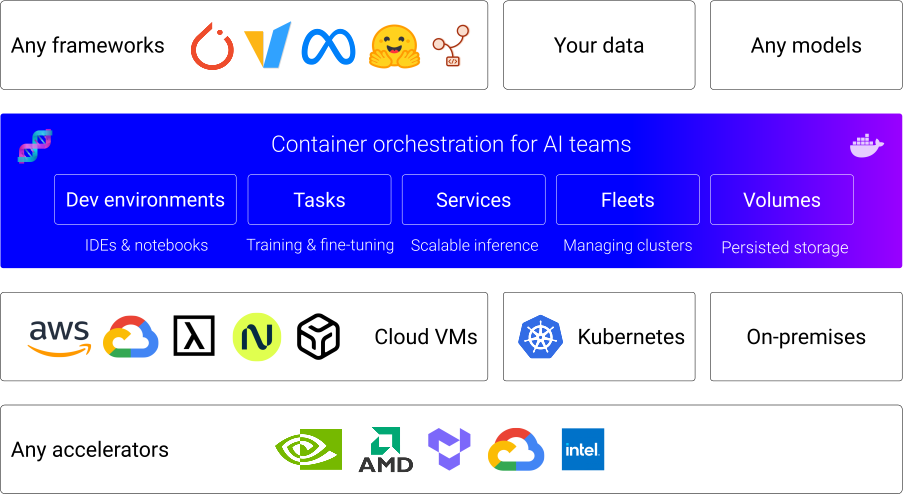
A unified control plane for GPU orchestration
Managing AI infrastructure requires efficient GPU orchestration tightly integrated with open-source training and inference frameworks.
dstack provides a unified control plane—so workloads stay portable, reproducible, and infrastructure remains interchangeable.











Native integration with GPU clouds
dstack natively integrates with leading GPU clouds for fast, efficient provisioning.
It can provision and manage GPU VMs directly through cloud APIs, or operate through Kubernetes when required.
Easy to use with on-prem clusters
If you already run Kubernetes on-prem, connect your cluster to dstack using the Kubernetes backend.
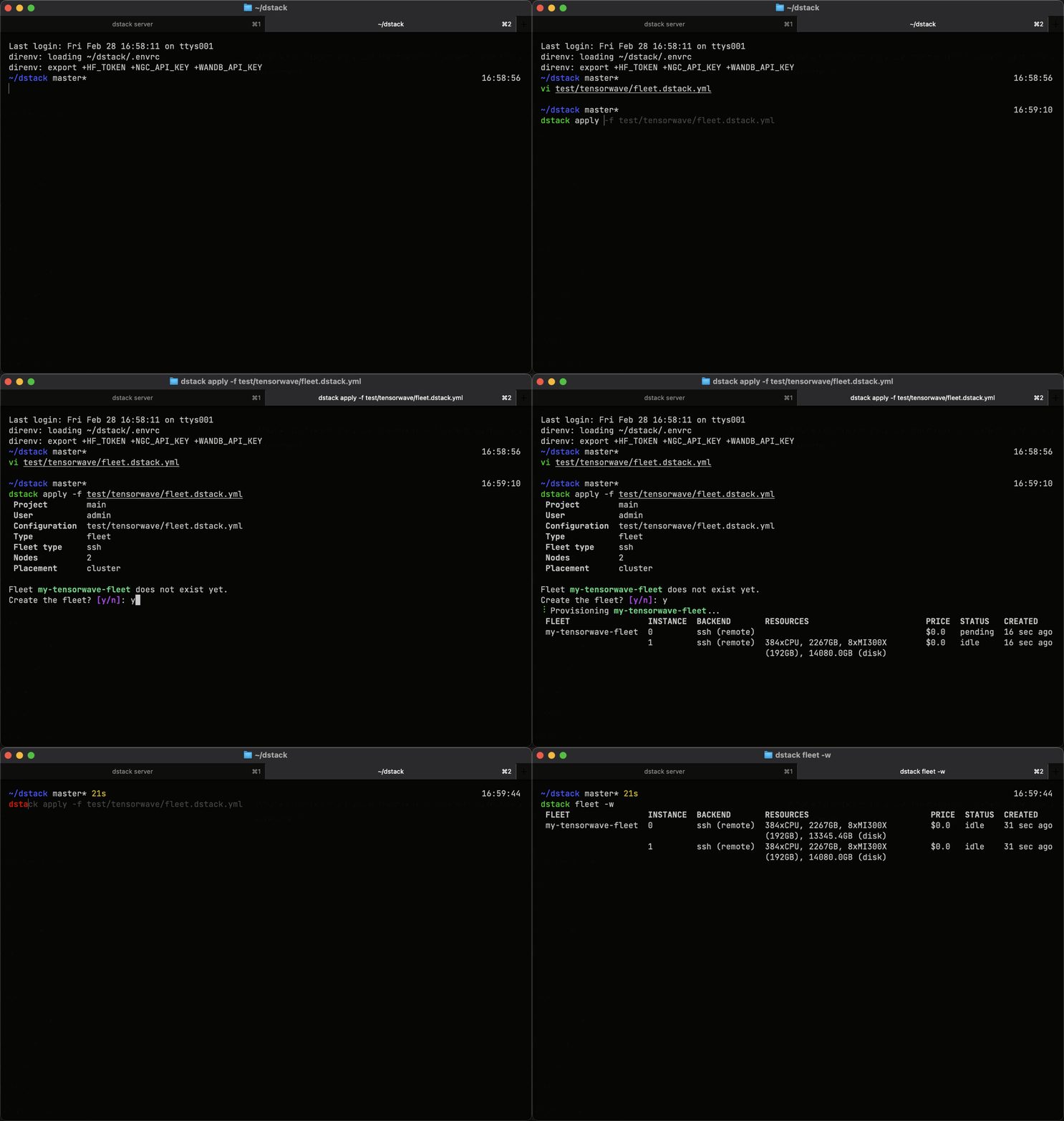
For bare-metal servers or VMs without Kubernetes, use SSH fleets to orchestrate GPUs directly.
Dev environments
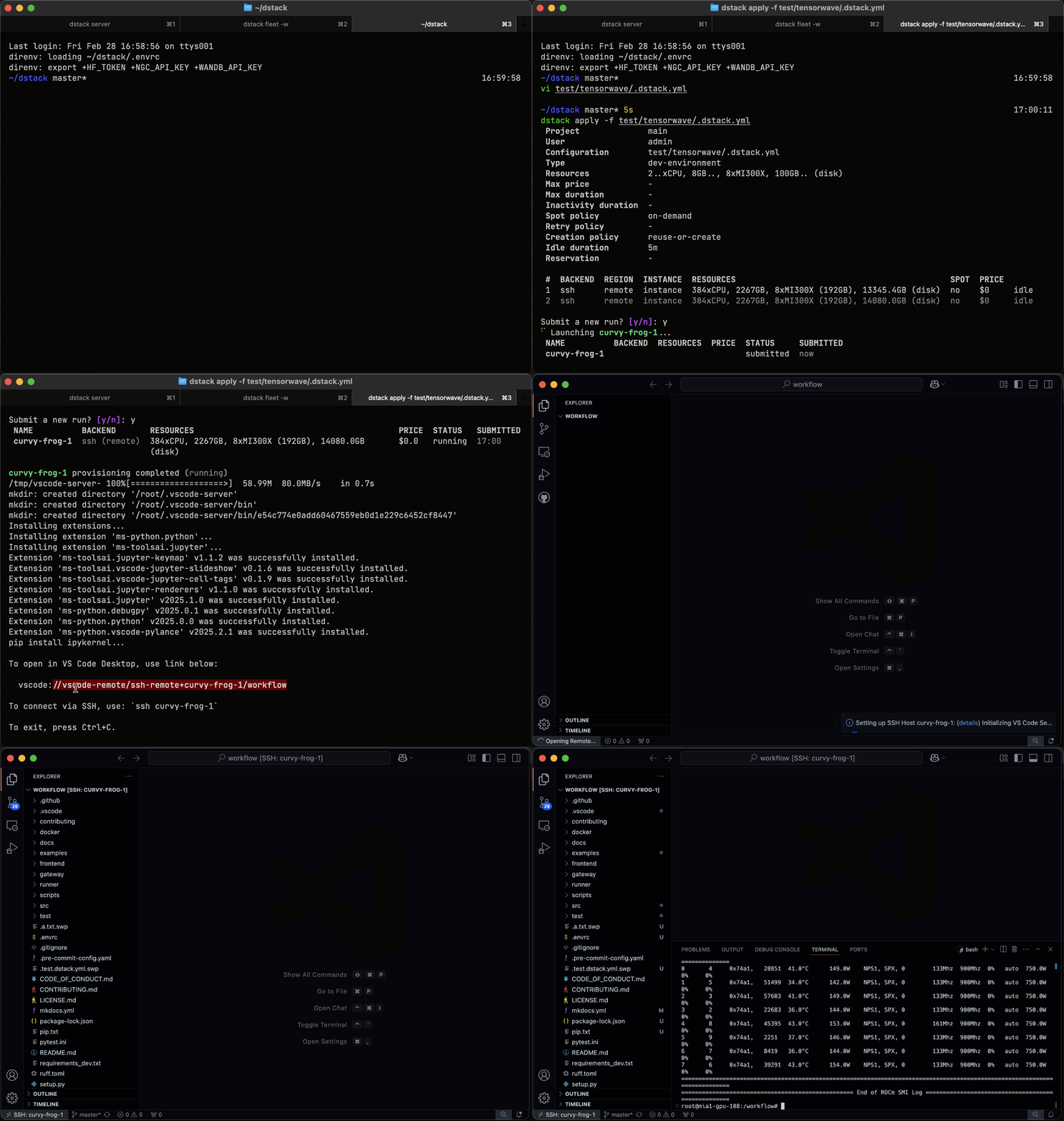
Before training or deploying models, ML engineers need interactive GPU access to experiment and debug.
dstack's dev environments let you connect desktop IDEs such as VS Code, Cursor, and Windsurf directly to cloud or on-prem GPUs.
Single-node & distributed tasks
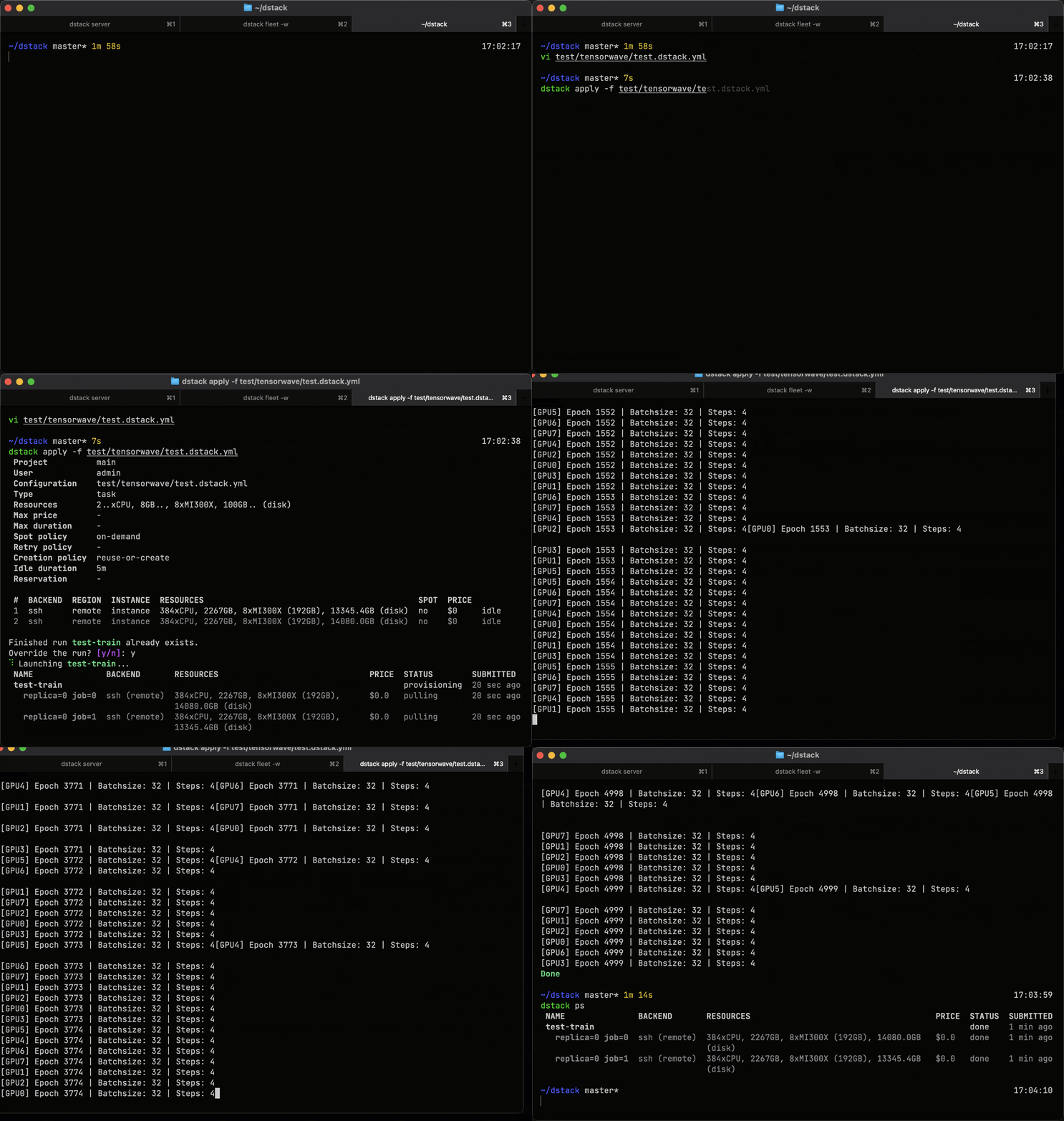
Run training or batch workloads on a single GPU, or scale to multi-GPU and multi-node clusters using simple task configurations. dstack automates cluster provisioning, resource allocation, and job scheduling.
During execution, dstack reports GPU utilization, memory usage, and GPU health metrics for each job.
Scalable model inference
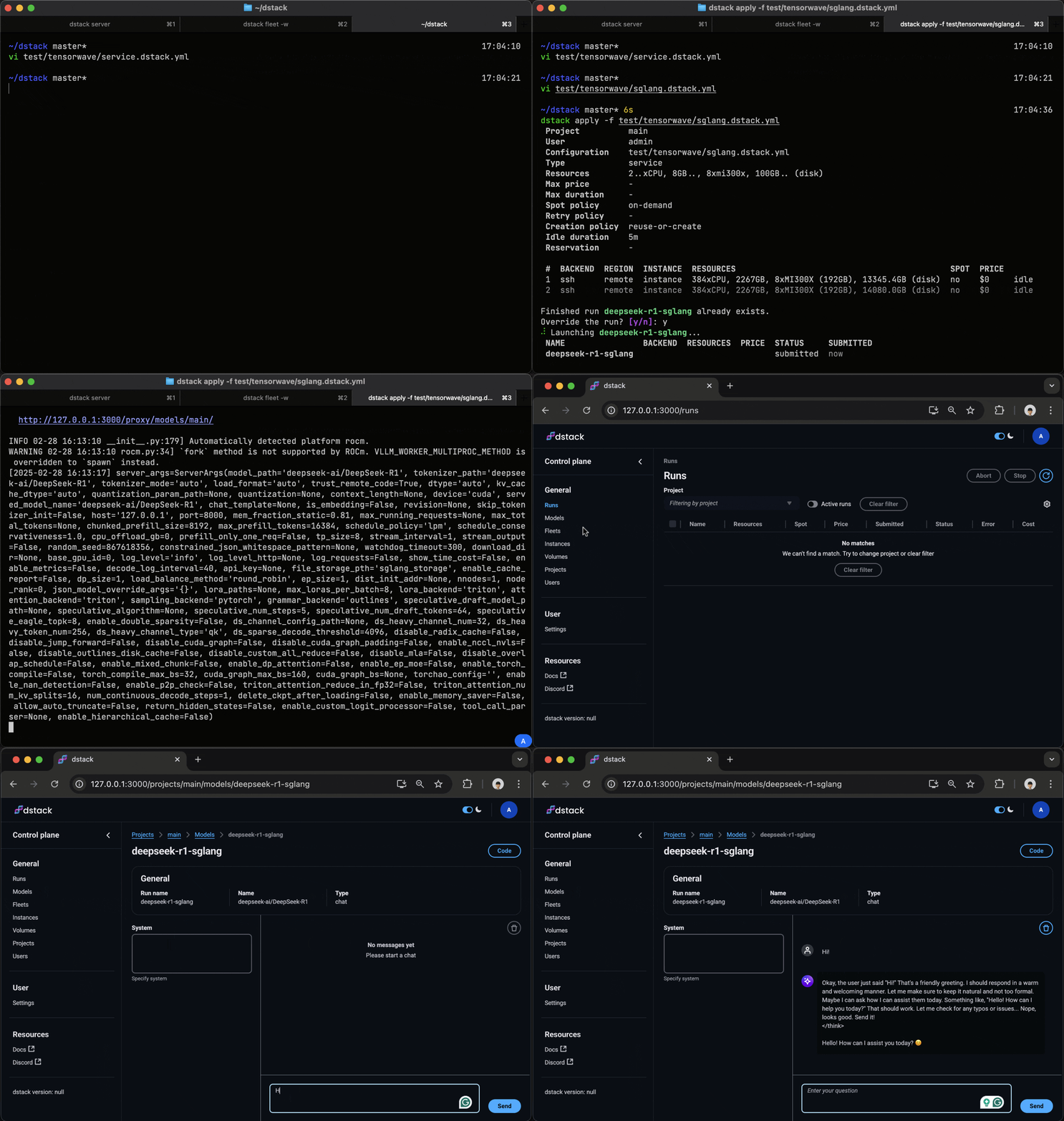
With dstack, you can deploy models as secure, auto-scaling, OpenAI-compatible endpoints, integrating with top open-source serving frameworks.
dstack supports disaggregated prefill/decode and cache-aware routing, providing production-grade, optimized inference.
Loved by world-class AI teams

Wah Loon Keng
Sr. AI Engineer @Electronic Arts
With dstack, AI researchers at EA can spin up and scale experiments without touching infrastructure. It supports everything from quick prototyping to multi-node training on any cloud.

Aleksandr Movchan
ML Engineer @Mobius Labs
Thanks to dstack, my team can quickly tap into affordable GPUs and streamline our workflows from testing and development to full-scale application deployment.

Alvaro Bartolome
ML Engineer @Argilla
With dstack it's incredibly easy to define a configuration within a repository and run it without worrying about GPU availability. It lets you focus on data and your research.

Park Chansung
ML Researcher @ETRI
Thanks to dstack, I can effortlessly access the top GPU options across different clouds, saving me time and money while pushing my AI work forward.

Eckart Burgwedel
CEO @Uberchord
With dstack, running LLMs on a cloud GPU is as easy as running a local Docker container. It combines the ease of Docker with the auto-scaling capabilities of K8S.

Peter Hill
Co-Founder @CUDO Compute
dstack simplifies infrastructure provisioning and AI development. If your team is on the lookout for an AI platform, I wholeheartedly recommend dstack.
FAQ
Slurm is a battle-tested system with decades of production use in HPC environments. dstack by contrast, is built for modern ML/AI workloads with cloud-native provisioning and a container-first architecture. While both support distributed training and batch jobs, dstack also natively supports development and production-grade inference.
See the migration guide for a detailed comparison.
Kubernetes is a general-purpose container orchestrator. dstack also orchestrates containers, but it provides a lightweight and streamlined interface that is purpose built for ML.
You declare dev environments, tasks, services, and fleets with simple configuration. dstack provisions GPUs, manages clusters via fleets with fine-grained controls, and optimizes cost and utilization, while keeping a simple UI and CLI.
If you already use Kubernetes, you can run dstack on it via the Kubernetes backend.
Yes. You can connect existing Kubernetes clusters using the Kubernetes backend and run dev environments, tasks, and services on it. Choose the Kubernetes backend if your GPUs already run on Kubernetes and your team depends on its ecosystem and tooling. See the Kubernetes guide for setup and best practices.
If your priority is orchestrating cloud GPUs and Kubernetes isn’t a must, VM-based backends are a better fit thanks to their native cloud integration. For on-prem GPUs where Kubernetes is optional, SSH fleets provide a simpler and more lightweight alternative.
dstack accelerates ML development with a simple, ML‑native interface. Spin up dev environments, run single‑node or distributed tasks, and deploy services without infrastructure overhead.
It radically reduces GPU costs via smart orchestration and fine‑grained fleet controls, including efficient reuse, right‑sizing, and support for spot, on‑demand, and reserved capacity.
It is 100% interoperable with your stack and works with any open‑source frameworks and tools, as well as your own Docker images and code, across GPU clouds, Kubernetes, and on‑prem GPUs.
Have questions, or need help?
Discord
Talk to us
Get started in minutes
Install dstack on your laptop via uv and start it using the CLI, or deploy it anywhere with the dstackai/dstack Docker image.
Set up backends or SSH fleets, then add your team.
dstack Sky
Don't want to host the dstack server or want to get the cheapest GPUs from the marketplace?
dstack Enterprise
Looking for a self-hosted dstack with SSO, governance controls, and enterprise support?